 Clearlane
Clearlane Forecast
When will it be done?
Forecast answers the question every team gets asked, using nothing but your own Jira history.
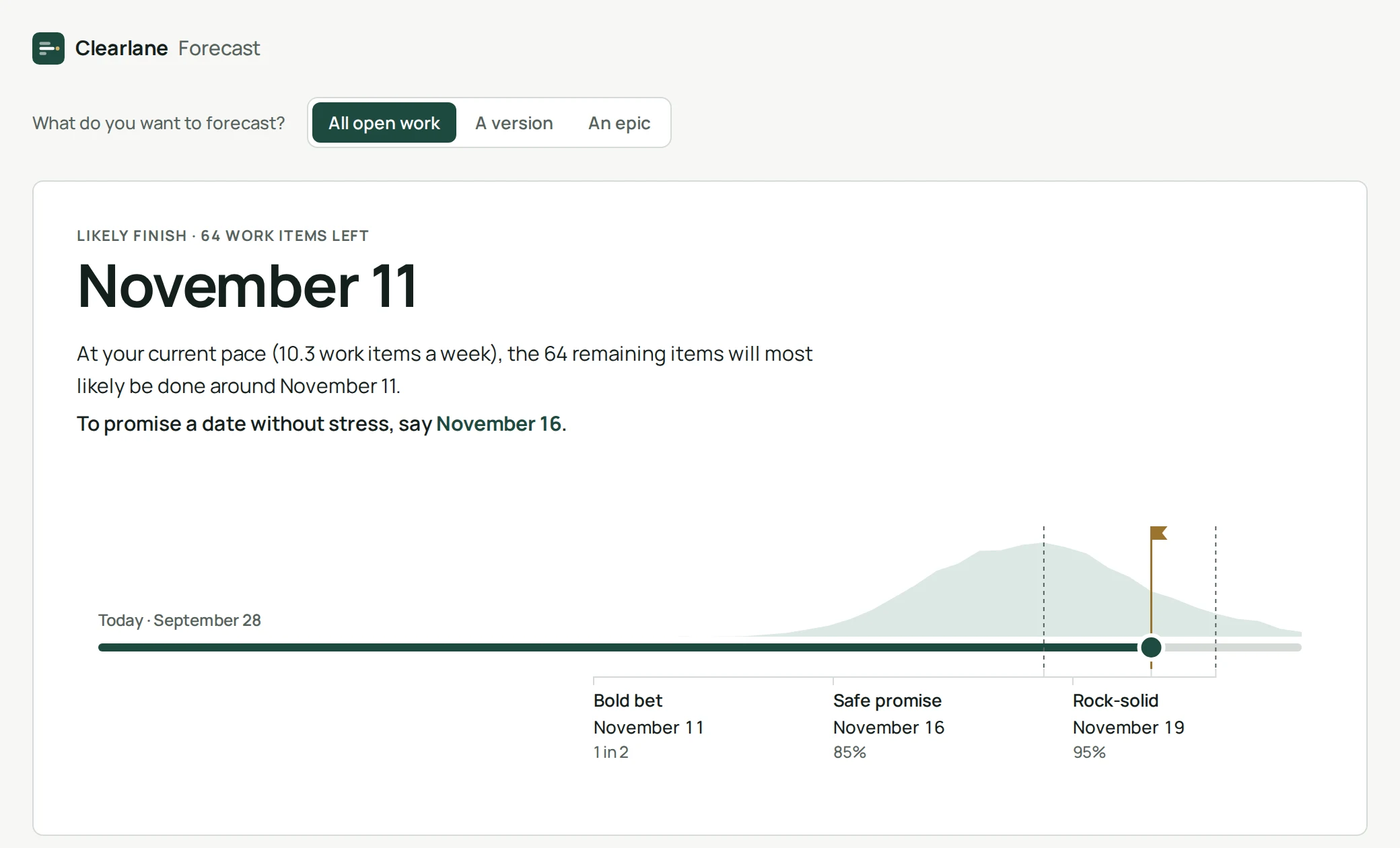
How it works
Forecast counts how many work items your project finished on each of the last 84 days. It then plays out 10,000 possible futures by drawing from those real days, until the work you picked is done. The spread of those futures gives the dates.
Reading the three dates
- Bold bet: half of the futures finish by this date.
- Safe promise: 85 out of 100 futures finish by this date. This is the one to give your stakeholders.
- Rock-solid: 95 out of 100 futures finish by this date.
What counts
Stories, tasks, bugs and other standard work items. Epics and subtasks are left out so nothing is counted twice. Work is “finished” when it reaches a status in the Done category.
Permissions and data
Forecast only reads your Jira work, with the permissions of the person looking at the page. It stores nothing and sends nothing outside your Atlassian site.
- Where do I find it?
- Open any project in Jira and choose Clearlane Forecast in the project sidebar.
- Why does it say there is not enough history?
- The project finished no work item in the last twelve weeks, so there is no pace to learn from yet.
- Can I forecast a single epic?
- Yes. Choose “An epic” and pick it from the list.